Interaction Levels
HomeInteractivity Levels
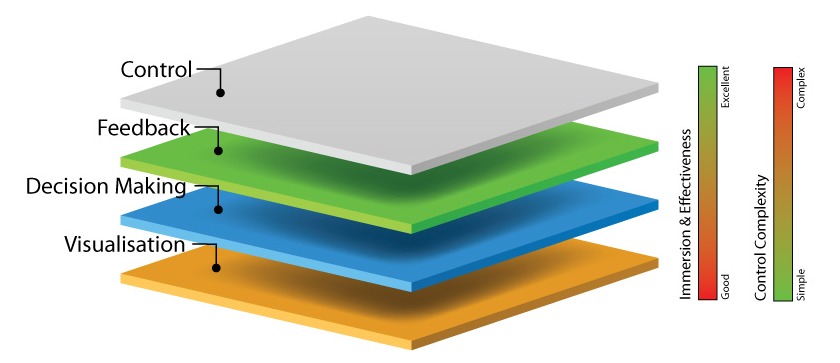
When designing your 3D training you will have a number of options. One of the most important is the 'interaction level' - how much freedom you will be giving your trainees in the environment.
There are a number of options available each with their own advantages and disadvantages.
But you aren't restricted to just one level of interactivity. You can mix-and-match them to suit different requirements. For example, your managers may only need a brief overview of a procedure, so a non-interactive video is more than enough to bring them up to speed. But your front-line staff who will be performing the procedure every day may need a more 'hands on' training session - they have a different level of interactivity.
Movie Mode
Movie mode is a quick, non-ineractive run through your training.
It is simple, voice-guided and provides a quick and easy overview of the training material.
Ideal For:
Those who need to be aware of the content of the training, but will rarely perform it - managers and administration staff particularly.
Advantages:
- Fast - watching the process is extremely quick.
- Simple - there are no controls. You simply hit 'play' and you begin to automatically move through the 3D environment.
Disadvantages:
- Low Immersion - the experience does not feel as 'real' as a more interactive, responsive environment would be and is therefore less effective.
- No Feedback - since your staff are not making choices, there is no way to verify if the information was actually absorbed by the person watching.
Guided Modes
A guided training experience walks your trainees through the virtual environment, providing simple point-and-click options at key points in the training where they need to select the correct action.
By taking care of movement for you the experience is very accessible for users who have difficulty with the a high level of control.
Guided training experiences can be 'Fail' or 'No-Fail'. In a no fail training exercise the user must get the answer right before they can continue, while in 'Fail' exercises the user may make an incorrect decision at an earlier stage that causes a negative result at a later point.
Ideal For:
Those performing the task occasionally, but not in a dangerous or highly technical role.. It is also an excellent option for those sites with older staff or those that show a lot of resistance to computers.
Advantages:
- Simple Controls - By taking care of camera movement, the interface is reduced to point-and-click.
Disadvantages:
- No Sequence Training - because the user is guided to each part of the environment in the correct order, it doesn't test their knowledge of the sequence of events.
- Reduced Feedback - no-fail training modules don't give strong feedback should you make an incorrect decision, which reduces the emotional impact of negative results.
Full Control
With full control your trainees will be able to explore the environment with freedom. They can walk around to the key locations in your environment and perform actions incorrectly and out-of-sequence.
This is the closest experience to being on the real plant itself.
Ideal For:
Staff who will regularly perform work, often perform dangerous work or need to be intimately familliar with the site and procedures. Excellent where you need users to show they have absorbed and understood training. It is also excellent for those who are being trained in multiple procedures at the same time as it allows you to train for a range of scenarios.
Advantages:
- Highly Immersive - with more freedom comes a more realistic experience and more effective learning.
- Realistic Decision Making - provides a more accurate simulation of real life. Trainees can make the same mistakes that they could in the real environment and are not forced into the correct order of events.
- More Possibilities - with full control it is possible to add additional 'hidden' content (such as the need to navigate around or deal with safety hazards) into the environment. Using a guided approach would not be suitable since the camera would have to focus on the hazard, which alerts the users and make the solution obvious.
- Improves Familiarity - exploring the environment at their own pace makes users much more familliar with it and the equipment within it.
- Forces Participation - although while it still isn't quite the real activity, the virtual environment gives them the next best thing. Making them move around in the environment not only adds to immersion but forces users to actively participate and focus on the experience.
Disadvantages:
- Complex Control - with more freedom comes more complex controls. While younger trainees or those famillair with games can find it easy, some people are resistant and less likely to master the concepts. However we find that the percentage of people with control issues are surprisingly low.
- Longer Training Time - it takes longer to complete training with full control, as people tend to take their time and look around, explore and familiarise themselves with both the controls and with the environment.
