Device Requirements
This package is designed to run on Android Honeycomb (Android 3.0) or higher devices.
Note that this package is designed to run well on phones and tablets released 2012 onwards. Examples include...
Phones: Samsung Galaxy 3 or the HTC One X / XL
Tablets: ASUS Transformer Prime, Google Nexus 7, All Tegra 3 Tablet PCs
While older systems may run the package, it may be slow or unresponsive.
Installing On Android Devices
Because this package (and most packages we create for our customers) are not released to the general public via the Google Play store, you will have to take some extra steps when installing this sample on your Android device.
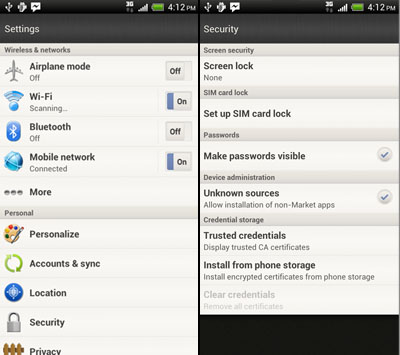
Step 1: Enable 'Non-Market Applications'
Open the settings for your Android device.
Under 'Security', make sure that 'Unknown Sources' is ticked to allow non-market Android apps to be installed.
Step 2: Download or Copy The APK File
Download the android package (APK) file to your device, or download it to your desktop and copy it across to your device.
Step 3: Install It
If your device doesn't automatically install the file for you, use a file browser (such as Astro File Manager) to locate the APK file on your device. Touch the file to install it.
Note that while most phones do not come with pre-installed file managers, many tablets already have them factory installed.